Design your email signature.
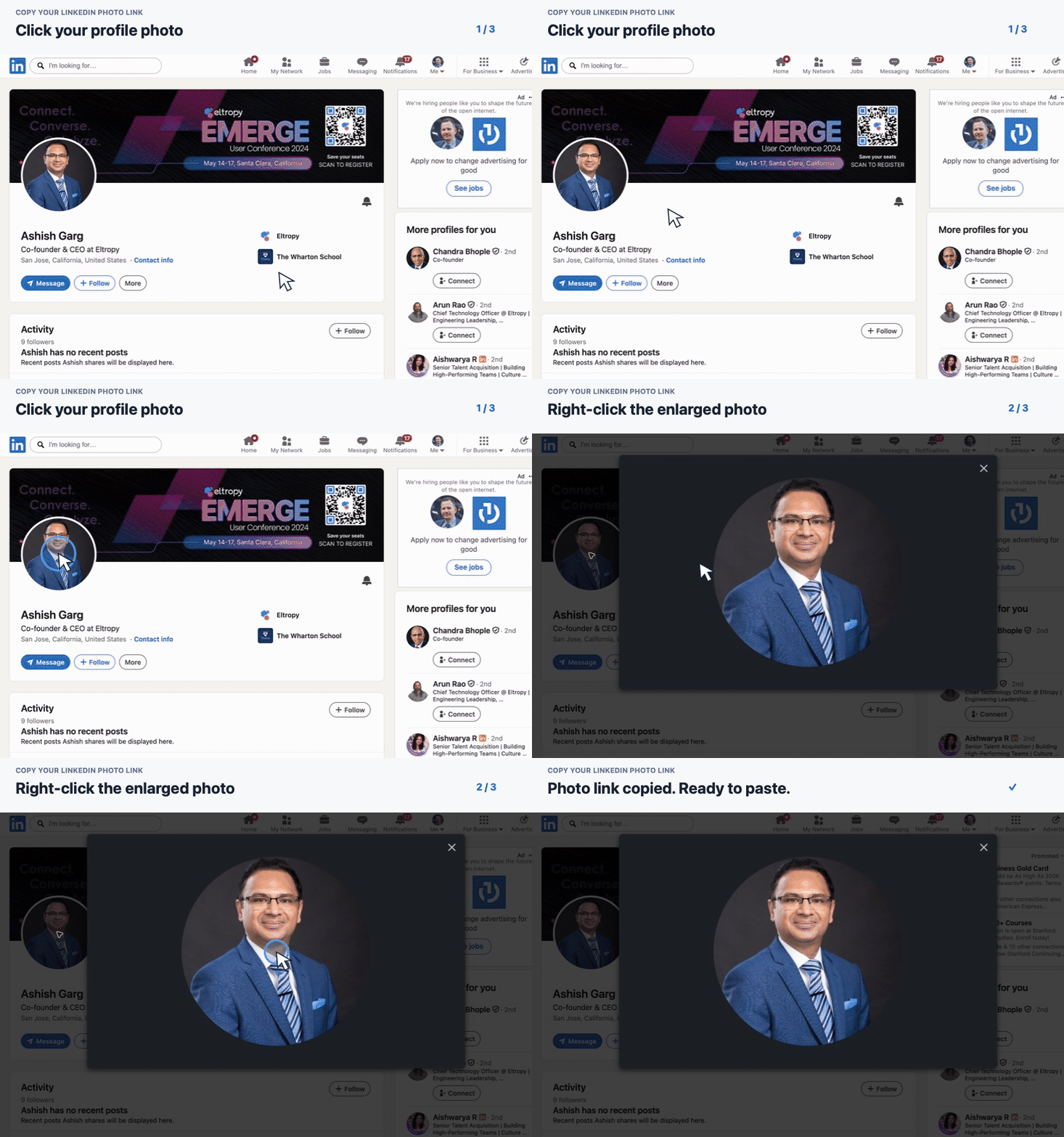
Fill in your details, add your photo from LinkedIn, then copy a Gmail-ready signature in one click.
? First time? Read the six-step Gmail guidePreview
See exactly what your signature will look like.
Your details stay in this browser. Nothing is uploaded by this kiosk.
Your details
Name, phone and email are required.
Six steps, about two minutes.
Do this once and every email you send goes out in the new brand.
Fill in your details
Name, phone and email are required. The preview on the left updates as you type.
Copy it
Click Copy for Gmail. That copies the signature with all its formatting.
Open Gmail settings
In Gmail, click the gear icon at the top right, then See all settings.
Find Signature
Stay on the General tab and scroll down to Signature. Click + Create new, give it a name, then Create.
Paste
Click inside the empty signature box and press ⌘ V.
Save
Under Signature defaults, pick your new signature for new emails and for replies. Then scroll to the bottom and click Save changes.
If something looks wrong